Cantabile vs Gig Performer vs ??? and some initial thoughts after some experimenting

Jim Soloway

Groupie
Messages
63
I've been using S-Gear for several years. When I'm playing at home, I play through the desktop app. When I'm recording I'm playing through the S-Gear desktop app for monitoring with the track muted and I have the plugin (or another amp plug) combined with several other plugins assigned to the track for playback. I can't play through the DAW because there's too much latency. When I'm playing out, I use a physical amp.

I'm interested in pursuing a setup that allows me play live at home with the same combination of plugins that I have assigned to the track. An even grander ambition would be to also be able to play out with the same setup running through an FRFR cab, essentially using the computer as a substitute for a modeler. I do recognize that the second ambition may be more than I will achieve but I've gotten far enough to believe that the first ambition should be doable.

For testing purposes, I have downloaded Cantabile Lite and the demo version of Gig Performer and after some initial confusion, I managed to get both working with stereo output from S-Gear (and three other amp sims) along with an external reverb plugin and and third party IR loader. Some observations from my first hours of testing.

Gig Performer seems easier to use with a more obvious interface. But Gig Performer stressed my computer resources to the point where I get a lot of random noise. I'm running on an 4 or 5 year old Windows computer so that may be more about my computer than Gig Performer. I am definitely ready to buy a new computer anyway but I'd love to hear about other experiences with Gig Performer. Is it a resource hog or does it work well on a newer, more powerful computer.

Cantabile has none of the noise issues of Gig Performer, but I find the interface much less intuitive. One obvious example is that Gig Performer gives me an easy option for disconnecting any of the blocks in a chain. I couldn't find that in Cantabile and Cantabile seems to route the output from each block both to the next block but also directly to the output.

And one problem that I found with both of them: with the exception of S-Gear, I was unable to access any of my saved parameters from any of my plugins. It's not a deal killer since I would be able to save the settings in a scene or song, but it does make the initial setup more difficult.

It's highly unlikely that I'm going back to a Mac any time soon but are there any other candidates for a Windows user that I should try. And I'd love to hear from other people who are trying something similar.
 
Last edited:
But Gig Performer stressed my computer resources to the point where I get a lot of random noise. I'm running on an 4 or 5 year old Windows computer so that may be more about my computer than Gig Performer.
I'm one of the developers of GP. It's hard to be definitive without knowing more about your setup, audio interface, and how you have configured your rackspaces with plugins but GP runs with no issues on machines all the way back to Windows 7 and customers even run it on those $400 Intel NUCs. I don't know what plugins you're using nor what audio driver you're using, but unless you tried to run everything in a single rackspace, you shouldn't be having a problem unless your machine is seriously CPU/RAM constrained.

And one problem that I found with both of them: with the exception of S-Gear, I was unable to access any of my saved parameters from any of my plugins

This makes no sense to me. What do you mean by "unable to access saved parameters"? Do you mean saved presets? While GP does have a unified user preset system independent of plugins, pretty much every plugin has its own preset manager through which you should be able to save your plugin settings for use in other systems.
 
I'm one of the developers of GP. It's hard to be definitive without knowing more about your setup, audio interface, and how you have configured your rackspaces with plugins but GP runs with no issues on machines all the way back to Windows 7 and customers even run it on those $400 Intel NUCs. I don't know what plugins you're using nor what audio driver you're using, but unless you tried to run everything in a single rackspace, you shouldn't be having a problem unless your machine is seriously CPU/RAM constrained.


This makes no sense to me. What do you mean by "unable to access saved parameters"? Do you mean saved presets? While GP does have a unified user preset system independent of plugins, pretty much every plugin has its own preset manager through which you should be able to save your plugin settings for use in other systems.
Thanks for the response.

The good news is that the noise I was talking about my well have been user error. I started from scratch and put together this. It's working just fine with noise clicks or distortion.
GpSetup.jpg


As for the missing parameters, maybe I'm missing something here but here are three shots of the PulseIR load. The first two are from Pulse running in Reaper. You can see the area and controls for the user saved parameters and in the second you can see the parameters that I have saved for reuse. The third shot is from GP and the parameter field and controls are gone. I had the same issue in a few plugins. How do I access those?
PulseIrLoaderInReaper1.jpg
PulseIrLoaderInReaper2.jpg
q
PulseIrLoaderInGP.jpg
 
Welcome! Your presence here is much appreciated I think!
Thanks.
second you can see the parameters that I have saved for reuse.
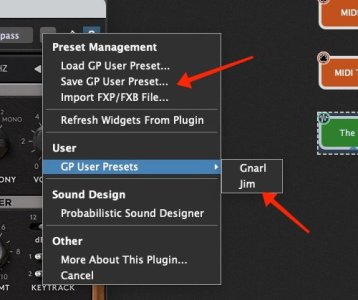
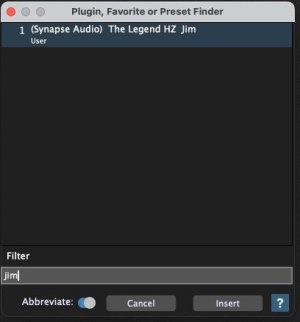
I'm not familiar with Reaper nor that plugin but it looks to me that what you're saving for reuse are actually Reaper managed presets, not individual parameters. In the GP world you would do this using GP's user preset management. In the first picture below you can see the popup menu where you can save presets. When you save them, they are automatically added to menus (I created a preset called Jim just to show this). If you have a particular plugin editor open, then the presets you saved show up in the User Presets sub-menu.

However (and perhaps more importantly) when you save a preset, it become searchable through the quick plugin finder dialog and it's plugin agnostic meaning that you don't have to remember which plugin you used for a particular sound. If you saved a preset called "My Favorite Strings" (say), you don't have to open (or even remember) which plugin you used. Just find "My Favorite Strings" and GP will automatically insert the correct plugin.
 

Attachments

  • screenshot_1179.jpg
    screenshot_1179.jpg
    39.9 KB · Views: 2
  • screenshot_1181.jpg
    screenshot_1181.jpg
    16.5 KB · Views: 1
Thanks! I'm becoming more and more intrigued by this whole concept. It should be interesting to see what I can cook up for my keyboard as well.
 
Just a note about Latency:

Full round trip Latency shouldn't change between using a plugin in a DAW or Plugin Host, or using a Standalone App (eg. S-Gear Standalone App). The standalone app will be using the same system as will be your plugin in your DAW to get your signal in, processed, and back out again to your monitoring system.

A big difference though is 'what is displayed / what is reported' ....

eg. some software (mostly standalone apps) might say, for example, buffer is giving you 2ms of latency, but that does not show the full round trip which is typically bigger (eg. 7ms). Round trip may only be shown / reported in a DAW (or maybe sometimes a Plugin Host ....maybe)... thus making you think it's worse, in latency, to run the plugin in a DAW, instead of the Standalone App.

The point being, that 2ms buffer latency doesn't give you the full picture for round trip latency where as your DAW will give you the full picture.
There is typically not going to be a difference in actual full round trip latency, so, running the software as a plugin or as a standalone app isn't changing anything about the full latency, but 'what is displayed / what is reported ' may be tricking your preferences.
 
Last edited:
Just a note about Latency:

Full round trip Latency shouldn't change between using a plugin in a DAW or Plugin Host, or using a Standalone App (eg. S-Gear Standalone App). The standalone app will be using the same system as will be your plugin in your DAW to get your signal in, processed, and back out again to your monitoring system.

A big difference though is 'what is displayed / what is reported' ....

eg. some software (mostly standalone apps) might say, for example, buffer is giving you 2ms of latency, but that does not show the full round trip which is typically bigger (eg. 7ms). Round trip may only be shown / reported in a DAW (or maybe sometimes a Plugin Host ....maybe)... thus making you think it's worse, in latency, to run the plugin in a DAW, instead of the Standalone App.

The point being, that 2ms buffer latency doesn't give you the full picture for round trip latency where as your DAW will give you the full picture.
There is typically not going to be a difference in actual full round trip latency, so, running the software as a plugin or as a standalone app isn't changing anything about the full latency, but 'what is displayed / what is reported ' may be tricking your preferences.
I don't think I've ever even looked at those stats. I just go by ears and my ears hear a clearly audible delay from the recording track in Reaper. As has been the case on a few things I've written about, it's entirely possible that my very limited engineering skills are the actual cause of that delay but what ever the cause, the delay is maddeningly obvious.
 
I don't think I've ever even looked at those stats. I just go by ears and my ears hear a clearly audible delay from the recording track in Reaper. As has been the case on a few things I've written about, it's entirely possible that my very limited engineering skills are the actual cause of that delay but what ever the cause, the delay is maddeningly obvious.

Ah fair enough! It's not usually difficult to set it up the right way. All it takes is to see your audio interface settings, probably then adjust something like 'block size / buffer size' in Reaper (or other DAW). The value needs adjusting to a lower number (64 is a decent starting point normally). It's very simple to do and that will lower any latency in your setup for live jamming and tracking. Lemme know if you want help (or not, and I'll leave it there).
 
Ah fair enough! It's not usually difficult to set it up the right way. All it takes is to see your audio interface settings, probably then adjust something like 'block size / buffer size' in Reaper (or other DAW). The value needs adjusting to a lower number (64 is a decent starting point normally). It's very simple to do and that will lower any latency in your setup for live jamming and tracking. Lemme know if you want help (or not, and I'll leave it there).
I am always willing to accept help on tech info. I know lots of music theory and I'm a reasonably good player but my tech knowledge is just enough to get me in a lot of trouble. And yes, setting the block size to 64 got rid of the latency. I followed that with a quick search about the block size in Reaper and it said to keep it small while tracking and make it larger while mixing. That makes a lot of things a lot easier. Thanks for the help.
 
What plugins are you using with it Ed (and happy new years)
You mean for guitar specific stuff?
Tonex, NDSP, Uaudio for “amp” sounds.

PSP pcm 42, nembrini 3000, TC2290 for delays.

UA channel strips. And comps.

I also use it with loaded down amps as an fx box. Then I use Cabinetron as IR loader.
 
I am always willing to accept help on tech info. I know lots of music theory and I'm a reasonably good player but my tech knowledge is just enough to get me in a lot of trouble. And yes, setting the block size to 64 got rid of the latency. I followed that with a quick search about the block size in Reaper and it said to keep it small while tracking and make it larger while mixing. That makes a lot of things a lot easier. Thanks for the help.


awesome! great to hear that little info sorted the troubles out =)
 
Back
Top