Here's something I wrote up at TOP many years ago. I could probably go through and update if helpful.
-----
One common question for people interested in getting into digital modelers is, what do I need to get along with them? Most high end modelers are standalone devices that don’t require external amps and effects, but they all will require some kind of playback system to hear yourself. Here’s a quick guide to monitoring your device along with some options.
Methods of Monitoring Your Sound
Guitar amp effects loop
If you already have a guitar amp that has an effects loop, you should be able to plug into the “return” of the loop. The benefit of this will be simplicity; you won’t have to use cab modeling on the device so it will be easier to make patches. If your modeler has the ability to turn off power amp modeling, this may be something to experiment with as a tube amp power section will change the tone. The downside is you are limited to the sound of the cab, especially if you have an open back combo and want a tight metal tone for instance.
Power amp and speaker cabinet
Another way to amplify your modeler that is still fairly easy to program is to use a standalone power amp with a speaker cabinet. This can save some weight and reduce noise issues. For power amps, there are small standalone devices like the EHX Magnum 44 ($150) up to the Seymour Duncan Powerstage ($500), as well as larger rack units like the Rocktron Mainline ($450) up to expensive stereo tube amps. For speaker cabinets, many 1x12 options start between $300-400 and go up from there.
I'll expand more on power amp types below.
Studio monitors
For home only use, studio monitors are a great choice. The big benefit is high quality sound at lower volumes and the ability to monitor in stereo. With monitors, you will need to use cabinet modeling which will typically require you to learn about and experiment with impulse responses, different cabinet and speaker types, and different microphones and mic placement. Cheaper studio monitors can be unnatural sounding but there are better options now than ever before, especially if you have the space for larger monitors. On the low end, JBL LSR305 are a good choice ($250 per pair), Yamaha HS8 are popular in the midrange ($800 per pair), and on the high end many people like Adam A7X ($1500 per pair).
Powered stage monitors (aka “FRFR”)
For gigging musicians or those who need to rehearse with a band at higher volumes, powered stage monitors or “FRFR” (full range flat response) are a good choice. These are higher powered and more rugged than studio monitors but more portable than large PA speakers and have an integrated power amp. Note that you will still need to use cabinet modeling in the device as the monitor will be very bright otherwise. Popular models include the Alto TS312 ($300), Yamaha DBR12 ($500), and QSC K12 ($800). There are also options more tailored to guitar modelers such as the Line 6 Powercab ($600), Friedman ASC12 ($1000), and Atomic CLR ($1000).
P.A. system
Another option if your band or club already has a PA system is to simply plug in to that. You will want to be sure to be able to check your levels and ideally have a global EQ that you can tweak to suit the environment. Remember that ears will hear different frequencies at different volumes, so make your adjustments at stage volume to best fit in with the band.
Headphones
One of the best features of modern modelers is the ability to produce great sound through headphones for late night practice. With impulse response cabinet sims and a little ambient reverb, you can get a fairly natural tone through headphones. The two main types of headphones people will use are closed and open back; closed will have less noise leaking in and out but can feel closed off, while open may leak some noise but can feel more natural. Some popular headphones are the Beyerdynamic DT880 ($250), Audio Technica ATH-M50X ($150), or Sennheiser HD6xx ($220).
Why Doesn't My Modeler Sound Like an Amp in the Room?
A very common complaint for people first getting into digital modeling is that it "doesn't sound like a real amp in the room". Most often, these people are plugging directly from the device into a full range speaker (monitors, PA system, headphones). There are a number of reasons amp modelers won't sound like an amp in the room (AITR):
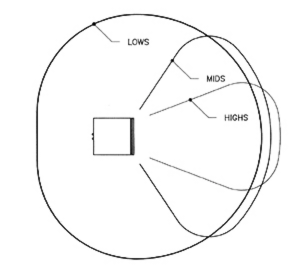
1. Guitar speakers are not full range flat response. Most guitar speakers are 12" in diameter which works well for producing low end and midrange but not high end frequencies. If you look at a high fidelity speaker, it will typically have a separate small driver (tweeter or horn) that produces those high frequencies. The guitar speaker rolls those off, which is a big reason why a distorted guitar sounds punchy and warm compared to plugging into a PA speaker which will sound bright and harsh.
Here's an example of the different frequency of a guitar speaker vs monitor:
2. Room reflections and diffusion add space and depth to the sound. When you play an amp in the room, you typically don't sit with your ear 2" off the speaker, but several feet away. This means you hear not only the sound of the amp, but the reflected sound bouncing around the room. In rooms with carpet and furniture, the high frequencies will be absorbed making the sound even warmer.
3. Cabinet simulations include microphone simulations which also filter the sound. The most common guitar mic is a Shure SM57 which emphasizes the upper midrange frequencies. This rolls off the high and low end, focusing the sound nicely when the guitar is playing with a full band, but can sound thin or harsh by itself. More on this below.
How to Get a More "Natural" Sound with FRFR
If you are using a modeler with studio monitors, headphones, or FRFR, there are a few ways you can counteract a bright or harsh tone:
1. Use high and low cuts after your cabinet block. Typically an engineer will cut high and low frequencies when mixing electric guitar either live or in the studio. Most modelers have high and low cuts built into the cabinet section of the modeler. A good starting point is about 80 Hz for the low end and 8.0 kHz at the high end. This will take out some of the deep rumbling bass and some of the fizzy high end. You can cut even more than this, especially with bring cabinets, so experiment.
2. Try different microphone options. Again, the typical guitar mic is a dynamic mic like an SM57 which can emphasize the upper midrange. If this is too bright and cutting, try adding a second mic or changing the mic to a different type. Condenser microphones (like an AKG C414 or Neumann U87) tend to be a little flatter response and ribbon mics (like the Royer R121 or Beyer M160) tend to emphasize low end and reduce high end. Many modelers have mic options in the cab block, otherwise you can try using impulse responses that use different mics or mixes of mics to have a more balanced tone.
3. Add a little reverb or delay. Most cab sims are going to capture the sound of a microphone right up against the speaker, which sounds unnatural by itself. Try adding a little room reverb after the cabinet block which could bring back some of the natural decay of an amp in the room. Another option is to add a short delay to the guitar (preferably a warm analog or tape delay) which will add a bit of depth without being muddy. This is a very common trick not only for guitars but vocals!
The Fletcher Munson Phenomenon (How to Not Get Lost in the Mix)
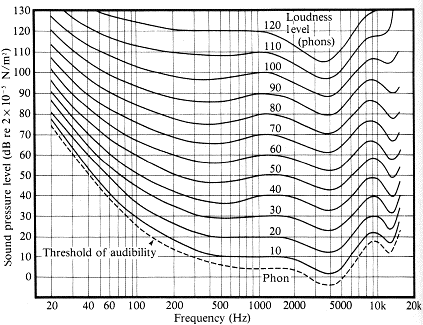
If you dial in a killer amp sound at home on your studio monitors then take it to a rehearsal, you may find you get lost in the mix or that it's way too bright. That's because humans don't hear all frequencies equally like a computer; we can hear certain midrange details at all volumes different than high and low frequencies. This helps us to hear predators walking through the forest or hear a baby crying from eight rooms away (ugh), but it can make it difficult to mix our tone properly at concert levels.
The best practice is to start your mixes at home but to fine tune them at concert levels either at rehearsal or if necessary during sound check. Try to use your modeler's global EQ to roll off the high and low end which can apply to all presets. Or start out using more midrange than you would expect, especially if you listen at low volumes normally. Either way, be prepared to make tweaks.