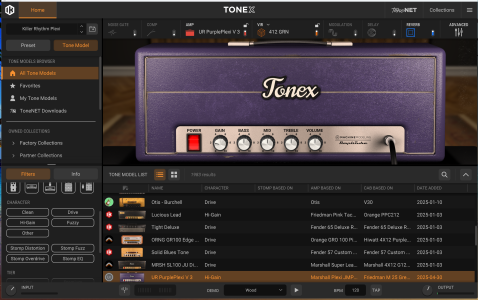
IK Multimedia TONEX

Is IK trying to win a contest for the most quirks in whatever software?

I mean, here's another one: In the plugin, when I go to ToneNET, I can select a capture and then use the arrow keys to go to the next or previous capture. Fine. But once I perform a search, wait for the results, then select one, the arrow keys stop to work. They are then again passed through to Logic.

Also, when I just close the plugin UI and reopen it, I'm back to the home tab and when clicking on the ToneNET tab, the search result is gone, the keyword I searched for is gone and the search criterium is back to "default" as well. Meh.

I'm now into this for - what? - 3 to 4 days and have already been stumbling over more quirks than during months of using other software.
 
Fwiw, can't you search by creator in the plugin?

Edit: Oh, you can. Yet another small clickbox you need to be aware of (this is really Steinberg style - clickboxes and menus friggin all over the place).

Yeah, that got me a few times in the beginning too. Their search engine is not my favorite. YMMV...
 
Yet another annoyance. I'm looking for cleans. So I want to have the ToneNET models sorted that way. In any decent typical collumn-based file browser, you'd click on the collumn's title bar and it'd show you things sorted by that title. But you can click "character" all day long any nothing will happen. The search options don't help, either.
Maybe IK should team up with Native Instruments to create the worst file browser on earth. Would at least earn them a golden raspberry.
 
Time for some praise. Went to the local shop because I wanted to have a look at their final sales (sucked, nothing of interest at all - prices of the leftover stuff still higher than at Thomann) and had the Tonex One with me (plus my HD25s, a short guitar cable, a USB C cable and a very small powerbank - didn't want to leave my phone unattended when grabbing another guitar). Had 3 patches prepared (clean and dirt for A/B mode, an acoustic patch for stomp mode). There's been pretty much nobody there, so I could just sit there on a couch and place the Tonex next to me on a small desk.
What could I possibly say? That's been the most comfortable guitar testrun experience *ever*. And while there's several other small USB powered units by now, I don't think any of them would've delivered the same kinda comfort. They may have other strengths, but I really, really dug the sounds coming out of the Tonex.

I can very defenitely see at least one more unit coming my way one day more or less soon, there's just soo many possible use cases and I don't want to mount and unmount it from the main board all the time.

So, even if IK could still do with some software housekeeping (in fact with quite some, if you asked me...), this pedal is a gem and I'm absolutely sure that for me, in addition to "never sell your Stomp", it'll also be like "never sell your Tonex One".
 
Btw, for my acoustic duties, I will have to create an "empty" capture even if the EQ is working without. Because without any capture loaded, there's no quick volume control (others than the global pedal volume, which I rather won't touch). This could possibly be changed in a FW update. Patch output volume should work all the time. And as it's a post-amp thing anyway, it could just be there.
 
Yuck, 40 minutes of training time just to get a neutral "through" amp. And this very Macbook Air is really feeling sluggish already.
 
Btw, how do you transfer a capture to another machine for training duties? I still have that Mac Pro hanging around and could finally make some use of it. Should possibly even be faster, given that it has a dedicated GPU.
 
Btw, how do you transfer a capture to another machine for training duties? I still have that Mac Pro hanging around and could finally make some use of it. Should possibly even be faster, given that it has a dedicated GPU.

You manually copy the training files from the Tonex folder to the other machine. If you want to torture yourself, Jason Sadites demonstrates it in his V2 video. You may need a shower after watching.
 
You manually copy the training files from the Tonex folder to the other machine.

Yeah, found that folder already. I gather that, once placed in the respective folder on my old Mac, they will automatically show up in the Tonex Modeler's training department, right?

---

Oh f*** - I just looked, my old Mac Pro is still on Mojave. No way to install the Modeler software there. I may one day patch it up via Open Core, but right now I absolutely don't feel like.
 
they will automatically show up in the Tonex Modeler's training department, right?

Yes, copy, THEN open Tonex and it should find them. I don't know what happens if you try to copy while Tonex is running, but I don't trust their software to handle something like that well at all. If it does work, that was probably by accident! As you have discovered, they go to great lengths to make the software as user unfriendly as they can.
 
Yet another annoyance. I'm looking for cleans. So I want to have the ToneNET models sorted that way. In any decent typical collumn-based file browser, you'd click on the collumn's title bar and it'd show you things sorted by that title. But you can click "character" all day long any nothing will happen. The search options don't help, either.
Maybe IK should team up with Native Instruments to create the worst file browser on earth. Would at least earn them a golden raspberry.

You can also use the filter option instead of sort. Don't worry, it's not explicitly obvious and intuitive either, but once you find the little unlabeled funnel/filter icon to click on, it expands a window where you can select clean and it should filter out the rest. I am not sure if this actually works in the plugin as I try to stick to the pedal and editor as much as possible and minimize my time with their software experience.
 
Don't worry, it's not explicitly obvious and intuitive either, but once you find the little unlabeled funnel/filter icon to click on, it expands a window where you can select clean and it should filter out the rest.

I did that. Doesn't work in the plugin, only in the Editor. Unless I'm missing something, which is fairly easy with IK software...
 
Guess I won't have a bright future as a capture creator. Capturing and training take about 35-40 minutes and I really can't work on the machine during that time. Sure, could cue things up and train them overnight, but then, I don't like the idea of having my computer switched on 24/7.
In case I can patch the Mac Pro up to Big Sur easily, I may give that a try. But defenitely not now.
 
Steer clear of them SkyNet amps, Riffy !

Play real tube amps.

giphy.gif

I did that. Doesn't work in the plugin, only in the Editor. Unless I'm missing something, which is fairly easy with IK software...
Sasha, yours doesn't look like this?

Bottom left under filters, you don't have the type of sounds you are looking for, like clean and so forth?
 

Attachments

  • Tonex screen grab for Sasha Frank.png
    Tonex screen grab for Sasha Frank.png
    3.9 MB · Views: 46
Sasha, yours doesn't look like this?

My oh my, feeling daft again... obviously it's there. And there's a "sort by character" function, too. I was just looking in "Tone Model" mode rather than in "ToneNET" mode.

You know what had me confused?
Here's the thing I thought was responsible for the filtering in the Editor:

TonexEditorSortBy.png


But what I missed was the little funnel alike icon on the left above it, which is actually opening the very same filter menu as in the plugin - just that it's located quite differently.
Also, in the plugin, the filter section is always there, whereas you need to explicitely click the funnel icon in the Editor.

So, while the confusion is defenitely mostly on my behalf, I still think it's also caused by the UI of either app being different. For which, at least IMO, there's little reason.
I'm not exactly a software illiterate person, but switching between the two applications (which I was doing a lot in the last days to see how I could fill up my Tonex One's preset slots) is really good to cause confusion.

You know what would be ideal? If there was no Editor at all. Both the plugin and the standalone Tonex app could have an extra mode to communicate with the pedal. There'd be an extra mode showing you the pedal's global and hardware settings and then a list of the 20 (or more on the full pedal) slots that you would then directly drag things to from your plugin's preset list. That'd solve all these issues in a heartbeat.
And fwiw, I wish it was the same with the Helix ecosystem.
 
Last edited:
Ok, yet another question.
The Tonex plugin has an option to lock the cab. That's extremely useful when you browse amp-only captures. I fail to find that lock option in the Tonex Editor. Am I just (again) missing something? Because in case I'm not, this should really be added as it's extremely useful.
 
I think the answer is no and im sure it's been discussed on all of these pages but for the tonex software, is there really not a boost pedal available to put in front of the amp?
 
but for the tonex software, is there really not a boost pedal available to put in front of the amp?

You could abuse the compressor. I do however agree that it'd be nice to have one. Maybe instead of the compressor (so hardware compatibility within certain CPU boundaries could be maintained). I'd also like to have an option to load an additional EQ instead of, say, the modulation FX.
 
You could abuse the compressor. I do however agree that it'd be nice to have one. Maybe instead of the compressor (so hardware compatibility within certain CPU boundaries could be maintained). I'd also like to have an option to load an additional EQ instead of, say, the modulation FX.
Yeah, both a boost and eq are so basic that im pretty shocked it is not in tonex somewhere.

It looks like you can use a pedal instead of an amp but meh.....
 
Back
Top