Calibrating Input Level for Plugins

For owners of the RME UFX III interface: the Maximum Input Level is 21 dBu, and the interface has a +8dB minimum gain.
For whatever reason, RME list their specs different to most, in that the maximum input level does not include the 8dB preamp gain. So I believe your maximum input level in real world terms (because you can’t go lower than +8dB) is 13dBu. So you would need to boost NDSP by 0.8dB when gain is set to minimum
 
For whatever reason, RME list their specs different to most, in that the maximum input level does not include the 8dB preamp gain. So I believe your maximum input level in real world terms (because you can’t go lower than +8dB) is 13dBu. So you would need to boost NDSP by 0.8dB when gain is set to minimum

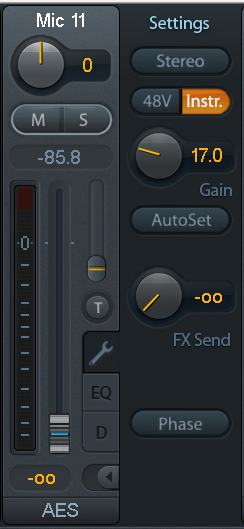
I also own a Line 6 Helix Rack. To get similar DI levels in my DAW between Helix Rack and RME UFX III, I need to set the Input Gain of the RME UFX III to around +17dB = + 9dB on top of the 8dB minimum gain of RME UFX III. Only adding 1dB (so 9dB in TotalMix) when using NDSP is definitively "not enough".

In that sense, it looks like the maximum input level of the RME UFX III really is 21dBu EDIT: No !!! It is 29dBu at gain 0dB and 21dBu at gain 8dB which is the minimum gain (END OF EDIT). I'll ask on the RME forums.

Are there any other people using an RME UFX III with plugins around here ?
 
Last edited:
Indeed, it looks like for the RME UFX III, the specs if written out like most other manufacturers do would read:

Maximum input level, Gain 0 dB: +29 dBu (but minimum Gain is 8 dB).

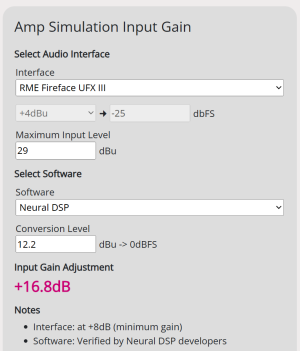
If you do that, then the level is correctly displayed for any plugins, such as NDSP with 16.8 Gain needed in TotalMix.
 

Attachments

  • Screenshot 2025-09-23 184310.png
    Screenshot 2025-09-23 184310.png
    74 KB · Views: 54
  • Screenshot 2025-09-23 185433.png
    Screenshot 2025-09-23 185433.png
    165.8 KB · Views: 61
Just interjecting on the TotalMix thing: TotalMix allows / processes non-integer increments but for some weird reason only displays interger values.
Hi,

According to MC (Admin on the RME forum), the gain range is only adjustable in 1 dB-steps.
 
Hi,

According to MC (Admin on the RME forum), the gain range is only adjustable in 1 dB-steps.
I measured it with a voltmeter and if you put in fractional values by double-clicking (like 1.2 dB or 2.3 dB), they take effect but the GUI will only show 1 dB or 2 dB. That's my experience with the UCX II.
 
hey folks please let me know
why this is so confusing at 2026 that amp sims as good as real thing but we still confused about adjusting input gain
is there anything that can adjust it for the player
i mean just plug and play
is it hard to do
i am sure that input gain is crucial beacause its gain staging.
 
hey folks please let me know
why this is so confusing at 2026 that amp sims as good as real thing but we still confused about adjusting input gain
is there anything that can adjust it for the player
i mean just plug and play
is it hard to do
i am sure that input gain is crucial beacause its gain staging.
If you use NAM profiles with calibration metadata you only key in your own interface's maximum input gain in that box and that's it - you're free to scroll through profiles (with calibration metadata) from different authors & you'll always get the proper response.
 
If you use NAM profiles with calibration metadata you only key in your own interface's maximum input gain in that box and that's it - you're free to scroll through profiles (with calibration metadata) from different authors & you'll always get the proper response.

where we get that software ?

can you explain what is written here in the boxes ??


Screenshot 2025-09-23 184310.png
 
where we get that software ?

can you explain what is written here in the boxes ??


View attachment 58205

Pick the one that's right for you:

1769064584620.png


Then have a look here & follow along but check your interface's manual & use those values:


That picture you're showing tells you this.

  • the RME has a 29 dBU input headroom; that tells you that if you plug something in the instrument input and it somehow can pump 21.831 Vrms (29 dBU), you will reach 0 dBFS (clipping) in the digital domain (DAW)

  • next up, it tells you that Neural DSP plugins were calibrated on an audio interface with 12.2 dbu (3.156 Vrms); their benchmark audio interface has less headroom (clips / reaches 0 dBFS in the DAW when presented with a much lower voltage level)

  • if you're playin through a RME interface & want to get the user experience NDSP intended, you then need to adjust for the delta between these 2 interfaces (29 - 12.2 = 16.8 dB); it tells you that you need to "loose" your high headroom by raising the overall signal volume by x amount (16.8 dB in this case)
 
where we get that software ?

can you explain what is written here in the boxes ??


View attachment 58205

1) What audio interface are you using?
2) What plugins are you using?

There is no standardized maximum input level in for audio interfaces and for plugins. In a nutshell: it's a mess.

This translates in the end user needing to adjust the input gain of their particular interface according to the plugin being used.

This is even more of a mess when using captures (e.g. TONEX) because the "creators" of captures are using different values as well.

This is non-relevant if you directly connect your guitar to a modeler, connected to your PC via USB.
 
if i dont want to use input gain at zero...
If you have to add that much gain, I’d add a sizeable amount of it at the preamp. RME are stepped gain anyway, so it’s easy to know what your headroom is and recall any value.

BUT ALSO, more importantly. Ghost Note has sort of copy and pasted data a bit haphazardly and his info isn’t thoroughly checked. If you check the manual for the UFX III
IMG_3870.jpeg


I can’t remember from memory, but I feel like RME are one of those companies that post their specs a bit weird. I’d double check those values are inclusive of the 8dB preamp gain - you’d either just need to leave it at minimum, or you’d need to add another 8dB to reach 13dBu headroom.

Most RME interfaces use 13dBu=0dBFS as their instrument input headroom. I know there are some outliers so it’s worth checking.
 
if i dont want to use input gain at zero...

Well, you can always split the "gain load". Add some bits of it on the physical input and then the rest with a gain plugin (or the input trim of the amp plugin). All you really need to know is how much the ideal input level of the plugin deviates from your interface's input trim at zero. Once you're there you can raise the input level anywhere in the signal chain (before hitting the amp plugin of course).
Obviously, you need an interface with digital readouts of the input trim's values - something my mere Motu M2 unfortunately doesn't have, so in my case it's a bit of guesswork should I want to raise the input trim (which I usually don't do because I can almost make the input clip at zero anyway, even with not too powerful pickups).
 
If you have to add that much gain, I’d add a sizeable amount of it at the preamp. RME are stepped gain anyway, so it’s easy to know what your headroom is and recall any value.
no i dont want to add that much gain thats not the purpose
my interface audient and their support desk answered that 0 gain input on the interface not sugessted
so because of that
i want to use input gain knob untill it clips as the manufacturer suggested
and then
which value should be chosen on the input of the software to proper gain staging (due to the software spec)
 
Last edited:
no i dont want to add that much gain thats not the purpose
my interface audient and their support desk answered that 0 gain input on the interface not sugessted on the interface
so because of that i asked what to do if i dont want to use zero gain level
i want to use input gain knob untill it clips as the manufacturer suggested
If you want to do it that way, you'll need to measure how much level you are adding each time you adjust the gain control for accurate levelling. You can do that, but most people find it annoying to keep doing, especially as it makes recalling values fiddly if you are changing values for different instruments. And if your signal is for all intents and purposes, identical (aside from level), is the trade off worth it?

All you have to do is run a sine wave in with gain at 0, then turn the gain control up and look how much the meters increase by. Then subtract that from your XdBu=0dBFS headroom specs from the manual.
 
i want to use input gain knob untill it clips as the manufacturer suggested

This is the traditional way. And it's still a decent way for some stuff - yet, with the interface trim at zero:
- You have a very clear reference point.
- Level differences between different guitars are represented.
- You could save the required boosts/cuts per plugin in a channel strip or on the plugin itself, allowing for total recall.

I'm not saying it's always the best way, I'm not always doing it like that, either (mainly because Logic sucks balls soooo much when dealing with low level recordings), but it's very reliable and just working.
 
If you want to do it that way, you'll need to measure how much level you are adding each time you adjust the gain control for accurate levelling. You can do that, but most people find it annoying to keep doing, especially as it makes recalling values fiddly if you are changing values for different instruments. And if your signal is for all intents and purposes, identical (aside from level), is the trade off worth it?

All you have to do is run a sine wave in with gain at 0, then turn the gain control up and look how much the meters increase by. Then subtract that from your XdBu=0dBFS headroom specs from the manual.
sir thank you very much
i will try to do that sine wave thing which i dont know anything about it
may i ask you to describe how to do that
 
may i ask you to describe how to do that
which bit are you struggling with?

Not the physical position of where you want the gain set for your guitar to be at the level you want.

Play a sine wave out of your DAW to your D/A outputs. run that into your instrument input with gain at minimum, look at the input level. Then turn the gain to where your guitar level wants to be, look at the meters again. Note the difference in level.
 
next up, it tells you that Neural DSP plugins were calibrated on an audio interface with 12.2 dbu (3.156 Vrms); their benchmark audio interface has less headroom (clips / reaches 0 dBFS in the DAW when presented with a much lower voltage level)
Hello @2dor , @MirrorProfiles and @volkan
I created an account just to ask my question because I share @volkan confusion.
TL;DR question:
- I am quoting @2dor critical information which is the basis of this whole calibration stuff; the plugin author (here for instance Neural DSP) provide a calibration figure based on THEIR audio interface (12.2 dbu in this case). Are they also setting their audio interface gain knob to 0 ?

Elaborated question:
This whole mess of "set your audio interface input gain to zero" started from community, not from plugin devs (to my knowledge), they also recommend (like Scuffhamamps and many) to set their audio interface gain enough to avoid clipping and maximising SNR. If this has started from plugin Dev to ensure the most homogeneous user experience they would have clearly state that we authors of this plugin we set our audio interface gain to zero to have a reference based on the audio interface (used during development) headroom at zero gain, and we recommend you (users) to do the same on your audio interface that we are on the same page.
because of the lack of this statement from plugin dev, I speculate about 2 options:
option 1- they also set their audio interface gain in a way to maximise SNR and avoid clipping but provide the audio interface headroom at gain zero just for (but worthless) reference. Thus our reference point that we consider golden is actually wrong, and we are all mislead by the plugin calibration data.
option 2- Plugin Devs in general have a special/high-end audio interfaces that allow them to still maximising the SNR ration by turning the gain knob + provide a readout of the headroom (i.e maximum input ) left at that gain setting (essentially an automated way of what @MirrorProfiles is suggesting with the sine-wave method). and then this calibration method at gain set to 0 of us end-users is still valid.


Hope I expressed well my question (English in not my main language, not even the second).
kindly,
LiCoRn

 
Back
Top