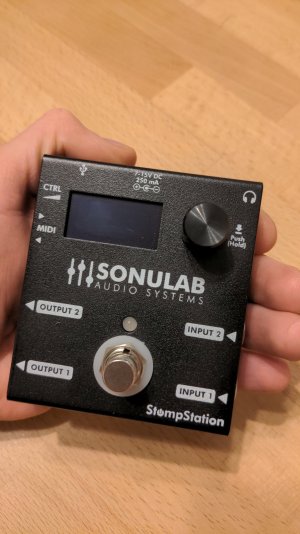
Stompstation by Sonulab (new NAM player pedal)

Seems like no one of you has tested it so far?

I've contacted Sonulab after chatting in another thread about the option to use an Ampero II Stomp and got the idea of using this device. Mainly I was confused on what that second Input is there for. The manual also just lists it as a blank passthrough.
Well, turns out they are working on implementing the secondary In- and Outputs as FX-Chain. This would set it well apart from TonexOne.

I was also asking about NAM A2 profiles, Control Input (is it only for Pedals or also for expression) and Expression Multiplexing sending Expression pedal values out via MIDI. I'll keep you updated.

By the way: Seems like they don't like to respond via email, but I had luck on Instagram.
 
Pulled the trigger! Got one for 220€ used (but basically new). Gave it a first look and try yesterday. My first impressions:

  • It's tiny! Should fit on every pedalboard somewhere. The form factor is a bit weird though.
  • It's a tough boy, probably able to take a beeting on stage if necessary. Not sure about the screen, but it's recessed into the case and pretty small, so should be alright.
  • It's quick! Started in no time, connected in no time, communication with the app seems to work with almost no hassle and pretty much no delay, switching presets feels seamless.
  • The built in tuner works alright, if your eyes are still okay, you can very well use the screen and very bright LED to tune your guitar. I like the visualization they did, makes everything very clear and works well. If the screen is to small for you, you can watch the tuner on your phone!
  • Adding NAMs is straight forward, altering and creating presets too.
  • The builtin effects are:
    • Gate: Very Good. Can also be very subtle and has an adjustable Decay. Makes it work very well with clean tones.
    • Comp: Okay
    • Amp: Great! Only depends on your NAM profile in the end.
    • IR: Great if you load your own, builtin ones are very dull and muffly.
    • EQ: Does its job.
    • The rest: Meh. Especially the Reverbs are a disappointing to me, in stereo there's a weird offset between left and right. Setting the mix to 1.00/100% doesn't feel like the pure Reverb for some reason.
I would say it's pretty much perfect for me, I didn't really care for the effects anyway and just wanted to have my Amp sound, IR and maybe a Comp and Gate. All of which work very well for me.

2026-01-26-17-10-34-279.jpg
 
Last edited:
Interesting update:
There are suddenly Firmware versions 2.4b and 2.5 available, while until a few days ago, only 2.3 was online and still branded as "(new)". It seems impossible to find out what 2.4b does, while 2.5 adds a second Delay, Wah and MIDI Expression controls.
I find it increasingly annoying that there are no change notes.

Also: My device running on v2.3 has some issues when switching presets via MIDI. Sometimes the sound is off, like it would load the wrong IR file or something. Switching back and forth fixes it, but it is weird and annoying. I would like to know if any of those updates does fix it.

 
Interesting update:
There are suddenly Firmware versions 2.4b and 2.5 available, while until a few days ago, only 2.3 was online and still branded as "(new)". It seems impossible to find out what 2.4b does, while 2.5 adds a second Delay, Wah and MIDI Expression controls.
I find it increasingly annoying that there are no change notes.

Also: My device running on v2.3 has some issues when switching presets via MIDI. Sometimes the sound is off, like it would load the wrong IR file or something. Switching back and forth fixes it, but it is weird and annoying. I would like to know if any of those updates does fix it.
I was playing around at home practicing some songs with our Live Set project opened in the DAW. When repeating certain sections, I had constantly wrong sounding presets. I was able to pin it down to the profiles, as when switching the profile back and forth would resolve the issue. When they introduced fast switching with the last update, this probably brought this issue with it. So I just did the update.

However, while I've not yet practiced with it to tell if this is resolved, there are a few other nice additions which were not yet publicly mentioned:
  • The Master section now has a "Controller 1" and "Controller 2", which can be assigned to a MIDI CC between 32 and 127, MIDI Learn is available. Every other parameter now has the ability to be assigned to either Controller 1 or 2 and therefor altered using the assigned CC of the controller. This allows for grouping! Sadly it does not seem to be possible to assign a MIDI CC without a Controller yet.
  • Each Controller can be set to "Ctrl" which probably means the Ctrl Input and the now added Expression MIDI Events.
  • There's a new "Expression" section, which allows the Ctrl Input to control Volume or a Wah effect. The controls look very versatile! There's a vintage and "Cry" mode, Position, Emphasis, Lo- and Hi-Sweep are adjustable as well as the "Off Value" (90%, 95% and 100% only).
  • The Delay Section now has a Modulation (not sure if it was there already) and the Dual Delay which can be added.
  • I think they added the option to set color saturation for the front LED when using Presets A and B via footswitch. At least I haven't seen that before.
Other notes: Adding NAM files is still converting them to proprietary format (as expected). Also I haven't found a way to calibrate the Expression Input. I'll report if the issues with MIDI preset switching is gone in a few days.
 
Back
Top