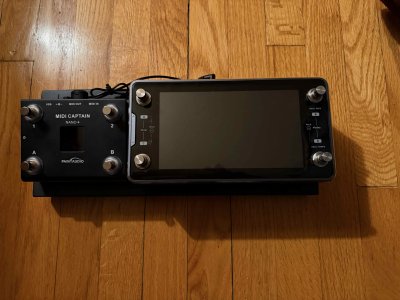
Paint Audio MIDI Captain foot controller

My approach is to use things that do exactly what I want uncovering it's full potential. I used many controllers. And all they firmwares and developers are not satisfying...
So, who can do better than me? Would love to meet that person.

The way changed for midiCaptain and pySwitch. Really thanks for pySwitch developer. Where anyone can build its own firmware with midi feedback for screen and led's. That's really huge.
I spent two hard weeks to make it work as I want. As pySwitch was designed to the Kemper setup - and my setup is Ableton - I have created some functions and classes for my own purpose. And it was much easier then to programm the unit from scratch (which is still achievable for an advanced users).
You're me 20 years ago. Wife and kid and a full time job, and an itch to actually play guitar every now and again... I can only spend so much time with my propeller hat on these days. But I think it's awesome you've made these strides with pySwitch.

The problem still not solved - the hardware. Mr. Wilson put a really slow and limited chip inside midiCaptain with so low memory...
I'd hesitate to call this a "problem". It's all relative. The h/w design was meant to reach a (very reasonable) price point for a very specific application. That application was more limited at time of release than it became with subsequent firmware releases. If he could have foreseen the open-ended nature of pySwitch customization etc. and thus chose a faster CPU, doubled the RAM, etc. and priced it at $300-$400, it might never have sold well enough to warrant that firmware development in the first place.

It's more fair to say that we're about due for a MIDI Captain MkII. But I think we can expect the price to rise considerably.
 
A final note: I still think the text file editing - while kind of shockingly retro on first impression - is a fine solution.
can only spend so much time with my propeller hat on these days.

I too have kept it in the original whatchamacallit mode. I spent many years writing database code so understanding the midi text file format came pretty quickly.

But my propeller hat is a little worn down (but not completely). I have to kick myself to dig into stuff and I have not used the MC in quite some time.

Midi gets a bad rap for being hard to understand. If you can suss Presets, Blocks, and Channels then you can do simple midi stuff. Just takes a little effort.

When I was playing out I used midi extensively and was an early adopter. Who has time to turn knobs in the middle of a song? Midi Controllers.....that's who. (y)
 
Last edited:
Share your insights - would love to admire your success 🤸
Don't be shy 🌞
It's all ITT.

Just poking fun at the weird flex. Just because someone knows how to hack a game doesn't make them the most experienced player.

I do applaud your efforts though.
 
Good morning! Has anyone tried setting up an expression pedal with the Johnson J-Station and Midi Captain 10? Thanks.:bonk
 
I picked up the Midi Captain Nano 4 to compliment my QC Mini. So far it's been great. I programmed three pages.

First page (MAIN)
SW1 (Top Left) Gig View - short press (sp) QC page change long press. (lp)
SW2 (Bottom Left) Tuner (sp)
SW3 (Top Right) Tap Tempo (sp) Open LooperX and QC page 1 (lp) (this also switches the page to the Looper page)
SW4 (Bottom Right) Scene/Preset/Stomp modes (sp).

Second page (LOOP)
SW1 Punch in/out (sp)
SW2 Record/Play/Stop (sp)
SW3 QC page change (sp)
SW4 Undo/Redo (sp) Close LooperX (lp) (This returns you to the main page)

Third Page (Presets)
SW1 preset up (sp) bank up (lp)
SW2 preset down (sp) bank down (lp)
SW3 gig view (sp)
SW4 factory/user/folder (sp)

I tried pyswitch but I couldn't make heads or tails as to how to program it. I couldn't get the web site to talk to anything properly. The text files made complete sense to my old school UNIX brain.

IMG_0488 (1).jpeg
 
Good morning! Has anyone tried setting up an expression pedal with the Johnson J-Station and Midi Captain 10? Thanks.:bonk
I managed to get this screencap before the paywall blurred the J-Station manual LOL. Find the CC# for the parameter you want to control on the J-Station, open the text file for whichever MIDI Captain preset you're using, find the line for Expression Pedal 1 CC (it's probably set to CC#1 by default, and change it.)

1771592882636.png
 
I picked up the Midi Captain Nano 4 to compliment my QC Mini. So far it's been great. I programmed three pages.

First page (MAIN)
SW1 (Top Left) Gig View - short press (sp) QC page change long press. (lp)
SW2 (Bottom Left) Tuner (sp)
SW3 (Top Right) Tap Tempo (sp) Open LooperX and QC page 1 (lp) (this also switches the page to the Looper page)
SW4 (Bottom Right) Scene/Preset/Stomp modes (sp).

Second page (LOOP)
SW1 Punch in/out (sp)
SW2 Record/Play/Stop (sp)
SW3 QC page change (sp)
SW4 Undo/Redo (sp) Close LooperX (lp) (This returns you to the main page)

Third Page (Presets)
SW1 preset up (sp) bank up (lp)
SW2 preset down (sp) bank down (lp)
SW3 gig view (sp)
SW4 factory/user/folder (sp)

I tried pyswitch but I couldn't make heads or tails as to how to program it. I couldn't get the web site to talk to anything properly. The text files made complete sense to my old school UNIX brain.

View attachment 59449
I hope you have a high capacity rechargeable battery mounted under that board? :)
 
Hi All.

I have a Paint Audio Mini 6 using Super Mode firmware. Currently key2 and key5 are defaulted for paging up and down the patches with a long press. The problem is, I'm using key5 to long press to play notes from a synthesizer, but when I do, the patch I am on changes. My question is how can I use super mode to change the default up and down for patches to allow long presses for other functions?
Anybody found a solution?
 
From Super Mode 4.0 user manual:

ledmode can be one of normal / select / tap, where select means that only one key configured as select is lit up at the same time to indicate selection
Note that the select configuration also has an implicit meaning. If a key configured as a multiple loop key has ledmode select, then when another key is pressed during the loop and returns, the loop status of the key will return to the initial state, that is, the function defined when pressed for the first time. On the contrary, if ledmode is normal, the previous loop will continue

So all my keys are ledmode=[select] on my page0.txt.
When I press key2 it's running short_dw1, when I press key1 it's running short_dw1, but when I press key2 again it's running short_dw2 instead of short_dw1 according to documentation listed above.
[key1]
keytimes = [1]
ledmode = [select]
ledcolor1 = [0x66FFFF][0x66FFFF][0x66FFFF]
short_dw1 = [16][CC][84][0] [1][PC][3][-]
long1 = [16][CC][84][127] [16][NT][00][04]

[key2]
keytimes = [3]
ledmode = [select]
ledcolor1 = [0x000000][0x000000][0x66FF00]
short_dw1 = [16][CC][84][0] [1][PC][0][-] [16][CC][84][127] [16][NT][00][01]
ledcolor2 = [0x66FF00][0x000000][0x66FF00]
short_dw2 = [16][CC][84][0] [1][PC][1][-] [16][CC][84][127] [16][NT][00][02]
ledcolor3 = [0x66FF00][0x66FF00][0x66FF00]
short_dw3 = [16][CC][84][0] [1][PC][2][-] [16][CC][84][127] [16][NT][00][03]
It's not working for me. Is it a bug or I just have a problem with my programming/understanding?
 
Back
Top