
You are using an out of date browser. It may not display this or other websites correctly.
You should upgrade or use an alternative browser.
You should upgrade or use an alternative browser.
Luminite Graviton M1 MIDI Controller
- Thread starter holoholo
- Start date

laxu
Rock Star
- Messages
- 8,911
Luminite has been quiet on the forums, but has been hard at work adding ever more features. You can check out the changes here:

You might need to read multiple items to get an overall view as each beta will just list what has changed since the last one.
You might need to read multiple items to get an overall view as each beta will just list what has changed since the last one.

gearJunkie
Rock Star
- Messages
- 2,870
Don't overlook the EC and XY controllers. They are a ton of fun and fairly inexpensive. Imagine the possibilities.I´ve just pulled the trigger... M1 on the way. Even when I don´t need it, it will put a beautiful screen by my Nano Cortex. And it will give me several advantages compared to my current setup.

barnabydog
Newbie
- Messages
- 2
I’m getting this interference from the M1 to a Phase 95. The Phase 95 is the only pedal I have that does this. The power supplies are isolated. The noise is still present when the pedal is some distance from the M1, and there’s only so far I want to move it with my current board layout. Has anyone seen anything similar?
gearJunkie
Rock Star
- Messages
- 2,870
Do you hear the noise when the Bluetooth MIDI and wireless controllers are disabled?I’m getting this interference from the M1 to a Phase 95. The Phase 95 is the only pedal I have that does this. The power supplies are isolated. The noise is still present when the pedal is some distance from the M1, and there’s only so far I want to move it with my current board layout. Has anyone seen anything similar?
View attachment 53007
My guess is that the wireless signals are the culprit. Have you tried using different patch cables with better shielding?
barnabydog
Newbie
- Messages
- 2
The noise happens with different cables, all cables removed from the M1, bluetooth and BLE midi turned off, the controllers unpaired and removed from the location, and the screen dimmed all the way. The MXR seems to be susceptible to noise in the signal path, anyway, in the way that phasers are. Maybe it’s defective but I assume it’s just the nature of the circuit.
gearJunkie
Rock Star
- Messages
- 2,870
What are you using for power? I've experienced noise issues with my Harmonious Monk (harmonic tremolo) when the psu wasn't supplying enough current.
Good luck with your quest.
Good luck with your quest.
I´ve just received my M1. I´m impressed... it´s a really cool device.
Right now, it´s not working with the Nano Cortex through the USB-HOST port. I ordered it because Luminite told me that it wroked... but contacted them and it seems they told me wrong, they meant the QC instead of the NC. But they are fixing it, so I hope it gets solved shortly.
So far, I think it´s a fantastic unit. It´ll serve me well.
EDIT: they already replied with a posible solution. I´ll check it tonight. Stunning support by Luminite.
Right now, it´s not working with the Nano Cortex through the USB-HOST port. I ordered it because Luminite told me that it wroked... but contacted them and it seems they told me wrong, they meant the QC instead of the NC. But they are fixing it, so I hope it gets solved shortly.
So far, I think it´s a fantastic unit. It´ll serve me well.
EDIT: they already replied with a posible solution. I´ll check it tonight. Stunning support by Luminite.
Last edited:
laxu
Rock Star
- Messages
- 8,911
Pretty impressive software update for the M1:
 luminitefx.com
Graviton M1 / M2 5.2.0 (Stable) Software Update
New Features: In comparison to version 5.0.0 Stable: Home > Preset Editor: Added ability to define 2nd / 3rd / Hold / Double Tap / Release commands inside presets — making them work on a per-preset basis instead of per-button / globally. Home > Preset Editor: Added ability to include all...
luminitefx.com

hunter
Roadie
- Messages
- 153
Just got mine.
First band rehearsal was fun, because the UA stuff has become so much more valuable while still giving me goose bumps when playing.
Still on a steep learning curve. Just saw here that the extra button options can now be used in preset and not button level. Exactly what was confusing me on my first steps. This makes way more sense.
I‘d wish for a few more display options, like for example the 10 presets view changing to live view for a second when receiving a command and then going back to the 10 presets view.
But already getting a ton of benefits from this stuff. Pricing is insanely great compared to competitors.
Got the 10 Switch FC, X/Y and EC. Crazy that those guitar controllers just cost around 25-30 bucks. Life is good!
First band rehearsal was fun, because the UA stuff has become so much more valuable while still giving me goose bumps when playing.
Still on a steep learning curve. Just saw here that the extra button options can now be used in preset and not button level. Exactly what was confusing me on my first steps. This makes way more sense.
I‘d wish for a few more display options, like for example the 10 presets view changing to live view for a second when receiving a command and then going back to the 10 presets view.
But already getting a ton of benefits from this stuff. Pricing is insanely great compared to competitors.
Got the 10 Switch FC, X/Y and EC. Crazy that those guitar controllers just cost around 25-30 bucks. Life is good!
Attachments
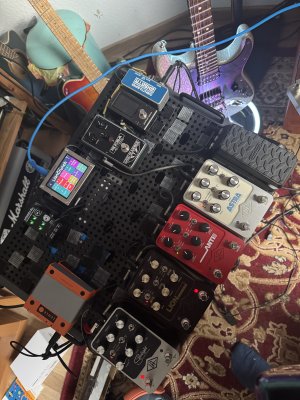
Last edited:
hunter
Roadie
- Messages
- 153
Unfortunately documentation is not really great - I think development is at higher speed than product management at Lumiite. But I figured it out thanks to a hint in Facebook. Te extra press actions are available on preset level, once you open a new event in the preset editor using the "+" sign and then click on the default "CC", there are three pages of event types and on the 3rd page or so are the extra press actions, you define one, like for example "double tap", and it will then trigger the event that is placed after that one.
So I managed to have one click load a preset on Anti and set delay level on Starlight, and double click do the same but also activate modulation on Astra. Pretty cool once you know how it's done.
They should get their act together and significantly improve the manual. It's such a powerful system, they should make it more accessible.
So I managed to have one click load a preset on Anti and set delay level on Starlight, and double click do the same but also activate modulation on Astra. Pretty cool once you know how it's done.
They should get their act together and significantly improve the manual. It's such a powerful system, they should make it more accessible.

paisleywookiee
Goatlord
- Messages
- 10,104
How’s the M2 compared to something like the Morningstar M6?
paisleywookiee
Goatlord
- Messages
- 10,104
Where is Luminite based out of?
![[Nathan]](/data/avatars/m/0/613.jpg?1726885163)
[Nathan]
Shredder
- Messages
- 1,415
I noticed mcrocklin is running some morningstar m6s or m8s and I’ve been wondering if the luminite is “as good” for mainly home use / plugin control. The Morningstar stuff looks amazing, I mean both of them look amazing I guess.How’s the M2 compared to something like the Morningstar M6?
I think Luminite is based in Thailand, but for Europe sales they ship from the UK. I was afraid that I'd have to pay custom taxes in Spain, but I hadn't. Even in a second shipping, it was fast and without taxes (they sent me an updated board, to see if it worked with the NC through USB host port... It didn't, though).
I can't compare it with Morningstar units because I've not spent time studying then. I can say the Luminite M1 is fantastic. I can't think of one single thing you can't do with it. I just hope they're finally able to make USB host work in the NC.
I can't compare it with Morningstar units because I've not spent time studying then. I can say the Luminite M1 is fantastic. I can't think of one single thing you can't do with it. I just hope they're finally able to make USB host work in the NC.
Jack Luminous
Groupie
- Messages
- 21
USB host still doesn't work with the GT1000Core for me either FWIW. Maybe with an upcoming update... Thing is still amazing anyway ! 

Skwizzerjumbs
Newbie
- Messages
- 11
Edit: I found the steps in another thread
Hello, I just received my M1 yesterday. I've basically been knocking around through the menus, trying to figure out how to configure this. I'm using it to control (mainly) an HX Stomp, and I have a DIY programmable MIDI switcher that I intend to use as triggers for the M1. Does anyone have a good resource for how to use PC messages with the Control > MIDI In view? I can get it to switch banks up and down, but it doesn't use PC 1 and PC 6, as I expected it to. Instead it uses PC 6 and PC 10. It also doesn't recognize PC 1-5 or PC 7-9. Do I need to program that into the M1, or should that work right out of the gate? I have verified the messages that are being sent to the M1 through the MIDI Monitor screen.
Hello, I just received my M1 yesterday. I've basically been knocking around through the menus, trying to figure out how to configure this. I'm using it to control (mainly) an HX Stomp, and I have a DIY programmable MIDI switcher that I intend to use as triggers for the M1. Does anyone have a good resource for how to use PC messages with the Control > MIDI In view? I can get it to switch banks up and down, but it doesn't use PC 1 and PC 6, as I expected it to. Instead it uses PC 6 and PC 10. It also doesn't recognize PC 1-5 or PC 7-9. Do I need to program that into the M1, or should that work right out of the gate? I have verified the messages that are being sent to the M1 through the MIDI Monitor screen.
Last edited:
hunter
Roadie
- Messages
- 153
I think the section Midi In from Page 61 of the manual is explaining how to set this upEdit: I found the steps in another thread
Hello, I just received my M1 yesterday. I've basically been knocking around through the menus, trying to figure out how to configure this. I'm using it to control (mainly) an HX Stomp, and I have a DIY programmable MIDI switcher that I intend to use as triggers for the M1. Does anyone have a good resource for how to use PC messages with the Control > MIDI In view? I can get it to switch banks up and down, but it doesn't use PC 1 and PC 6, as I expected it to. Instead it uses PC 6 and PC 10. It also doesn't recognize PC 1-5 or PC 7-9. Do I need to program that into the M1, or should that work right out of the gate? I have verified the messages that are being sent to the M1 through the MIDI Monitor screen.

Intimo
Groupie
- Messages
- 81
Similar threads
- Replies
- 2
- Views
- 170

- Replies
- 6
- Views
- 626


