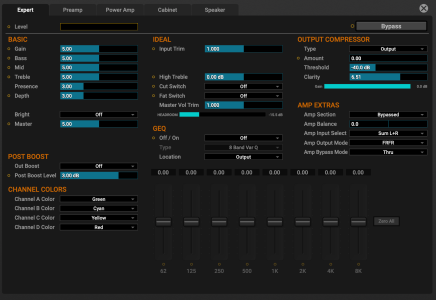
Fractal Audio Systems AM4 - Amp Modeler

Only thing I'm missing for this to happen are the two overdrive pedals (and the Carcosa is a stand in for the Dehme I have). Ampero MIDI controller would be use for channel selection of the amp block -- ideally I'd have a smaller 2-or-3 button switch but the Ampero is what I got on hand, so...

1764640199981.png
 
People on you tube
Man 4 blocks , and none of the deep amp block tweaking the more expensive units have ,

Cliff , hold my beer
 
I don't think so, but configuring foot control is a very personal thing. There are two quick-jump options to amp channel control already: Amp Mode and Channel Picker. For me it wouldn't make sense using one switch to cycle through 4 channels. As a toggle between two: yes, maybe.
Is there a way to use an external dual latching footswitch to access Amp Channel A and Amp Channel B? I'm not seeing how I'd do it

(1). Appears I need to assign a CC# to each amp channel, in which case there doesn't seem to be any way to convert the latched/unlatched state of the pedals to CC#/values.
(2). Doesn't look like you can use a modifier to control amp channel?
 
Is there a way to use an external dual latching footswitch to access Amp Channel A and Amp Channel B? I'm not seeing how I'd do it

(1). Appears I need to assign a CC# to each amp channel, in which case there doesn't seem to be any way to convert the latched/unlatched state of the pedals to CC#/values.
(2). Doesn't look like you can use a modifier to control amp channel?

Only way would be MIDI. Currently. But that would practically have the same result as channel picker or Amp Mode.

Schermafbeelding 2025-12-02 om 06.58.57.png
 
Only way would be MIDI. Currently. But that would practically have the same result as channel picker or Amp Mode.

View attachment 55778
How so? One button press, no? That's a whoooooool lot different than press hold followed by separate button press.

Edit to add: I want to be able to change amp channels with minimal fuss from the "effects" layout - I get that there are ways to do it with one button press from other layouts, but that then requires a little shifty foot hold thing to get to a place where you have 1-button access to the other three blocks.

If I were to use the AM4 standalone it would be:

(1) Drive block
(2) Delay block
(3) Amp block
(4) reverb Block

Ideally, I'd be able to either (a) use the amp button to toggle between Channel A and Channel B or (b) toggle on/off the input boost.

This isn't necessarily a deal breaker - but both of those functions seem like obvious and non-niche options for the "amp" button to do in effect mode. Or maybe I'm being Sasscha about it. :idk
 
Last edited:
How so? One button press, no? That's a whoooooool lot different than press hold followed by separate button press.

Edit to add: I want to be able to change amp channels with minimal fuss from the "effects" layout - I get that there are ways to do it with one button press from other layouts, but that then requires a little shifty foot hold thing to get to a place where you have 1-button access to the other three blocks.

If I were to use the AM4 standalone it would be:

(1) Drive block
(2) Delay block
(3) Amp block
(4) reverb Block

Ideally, I'd be able to either (a) use the amp button to toggle between Channel A and Channel B or (b) toggle on/off the input boost.

This isn't necessarily a deal breaker - but both of those functions seem like obvious and non-niche options for the "amp" button to do in effect mode. Or maybe I'm being Sasscha about it. :idk

There used to be a amp channel A/B option in the early days but it was cut out for now if that is the same feature you're talking about... Here's what Matt said over on forum.

"Channel A↔B was on my original list for Amp actions in FX Mode. (Right now those options are BOOST, BYPASS, and NOTHING) This could be added someday, but I want to let a solid number of people spend time with the new unit first.

One of the things that caused this to get kicked out is that I felt that hard-coding it to A and B was too limiting, but giving two options made it too complicated. So we made the call to totally axe it."
 
There used to be a amp channel A/B option in the early days but it was cut out for now if that is the same feature you're talking about... Here's what Matt said over on forum.

"Channel A↔B was on my original list for Amp actions in FX Mode. (Right now those options are BOOST, BYPASS, and NOTHING) This could be added someday, but I want to let a solid number of people spend time with the new unit first.

One of the things that caused this to get kicked out is that I felt that hard-coding it to A and B was too limiting, but giving two options made it too complicated. So we made the call to totally axe it."
Thanks, that context is super helpful.

I don't disagree with this analysis too much, but I'd argue that the number of people using "Bypass" is going to be like 0.1%; where the number of people that would use A<->B is at least in the 1-5% range.
 
So, while I indeed unsubscribed from this thread for a while (no worries, I won't revive any old stuff), I have some questions regarding switching. Yes, I did read some parts of the manual but maybe some things escape me.

It's about switching options.

Can I configure the switches in a way that each of them switches to one scene (so far obviously "yes") and does a second thing when I press it again (no hold-press actions, can't deal with them live)? Ideally that second "thing" would be to activate a boost and, say, a delay (and maybe even a drive pedal).

In case that's not possible: Is there a way to configure an external switch to do those "extra things"?

In general, my idea is to use 4 scenes as the foundation for each gig (I thought about some possible scenarios and with the channel thing per block I should be fine) and then modify them a bit. Such as creating a lead version of each scene with single switching action. I think it's possible to do what I want in case I only needed the amp boost, but typically I need 3 things to happen to transform any given baseline sound to a lead sound, namely the ones mentioned above: Some pre-boost, some level boost and some additional spatial effect (delay or reverb).

Is there any way to make this happen? Note: I wouldn't want to ever switch presets as I very, very often need a kinda "global" control over things, which is only possible as long as I stay within one patch.
 
There's still a lot of Fractal menu-diving™ at play, but damn, the UX looks really well though out. I'm impressed.
The only think that I personally don’t like but it is on most products these days is the switch combos
And the fact that If yoy use a custom layout it is global so you can’t say let’s make the effects hold pickers and the presets hold bank up bank down if you are not using gig mode you lose the special things it does
Matt from fractal said he has drawn up some additional switching options from feedback on the VP4 that may be implemented later so who knows

But it is hardly a deal breaker
I love this thing and likely will sell my FM9 if that tells you anything
 
Back
Top